What a WAN IP of 100.64.x.x Means on Your Router
A value from 100.64.0.0 through 100.127.255.255 belongs to shared address space.
An IP checker will normally show a different IPv4 address after the provider's translation.
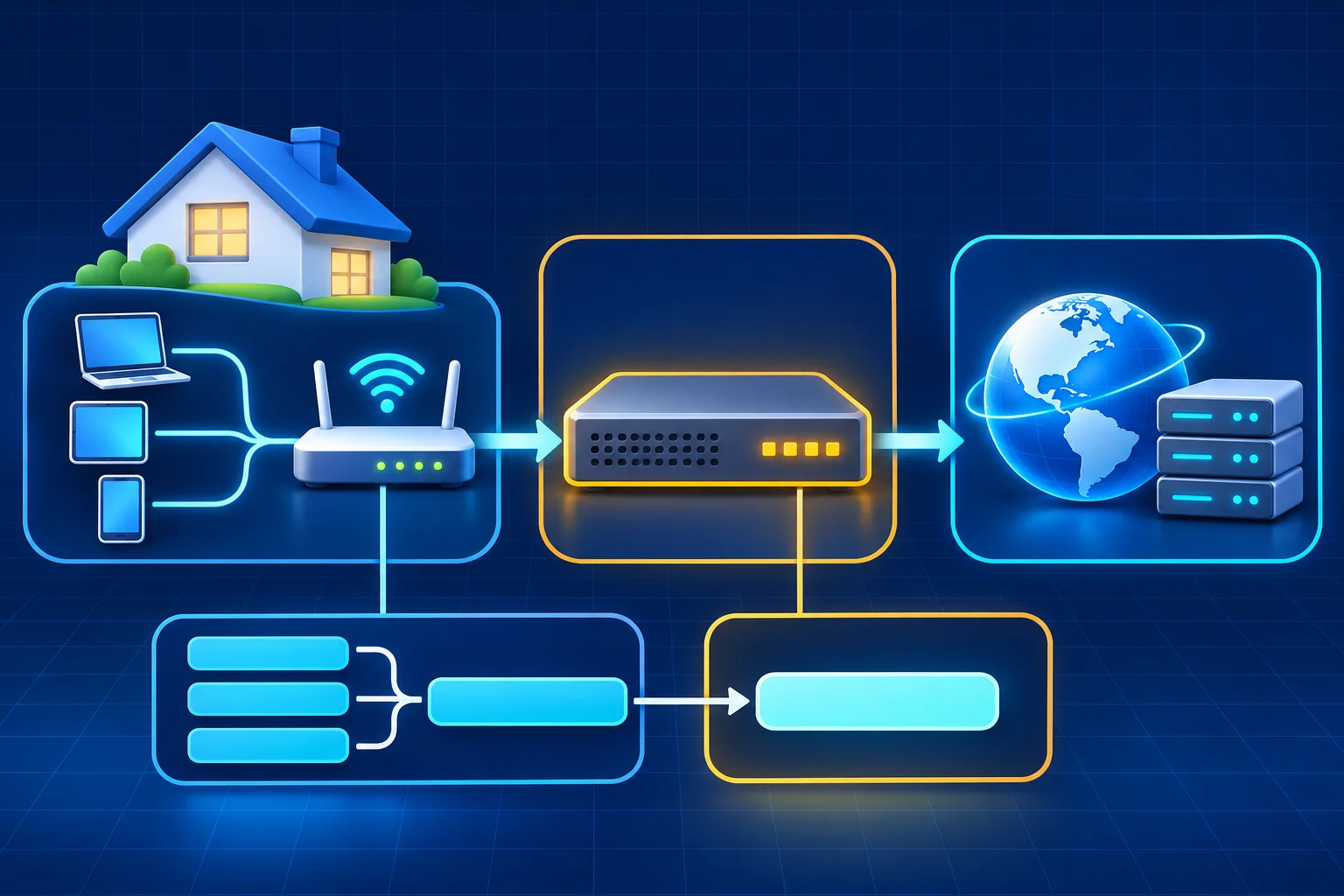
Your router performs one translation and the provider performs another before traffic reaches the internet.
Open your router's status page and you may see a WAN address such as 100.72.18.9. Then open an IP checker and see a completely different address. Nothing is broken. Those two screens are looking at different points on the same trip.
The WAN value is the address your provider gives your router inside its network. The public IP address is the value websites see after the provider translates your traffic. Knowing that difference helps explain failed port forwarding, surprise login locations, shared rate limits, and remote-access trouble.
Why 100.64.x.x appears on the WAN page
The Internet Engineering Task Force set aside 100.64.0.0/10 as Shared Address Space. Internet providers can use it between a customer's router and a large translation gateway. IANA lists the block as forwardable inside the right network but not globally reachable.
A /10 block contains 4,194,304 addresses. The first address is 100.64.0.0 and the last is 100.127.255.255. An address such as 100.63.9.2 is below the block, and 100.128.4.7 is above it. Looking only at the first number, 100, is not enough.
This shared block is different from the familiar home ranges. The RFC 1918 private ranges are 10.0.0.0/8, 172.16.0.0/12, and 192.168.0.0/16. Our guide to a private IP address explains why the same home-only addresses can be reused by many networks. Shared space solves a different problem. It gives providers a range that is less likely to clash with the customer's own home network.
| Point in the path | Example | What it tells you |
|---|---|---|
| Laptop | 192.168.1.23 | A private address used only inside the home network |
| Router LAN | 192.168.1.1 | The local gateway used by home devices |
| Router WAN | 100.72.18.9 | A shared address used between the router and provider |
| Public IPv4 | 203.0.113.44 | A documentation example for the address an internet site would see |
The example public address above comes from a documentation-only block, so nobody's real address is exposed. The important part is the shape of the path. Your device has one local address, your router may have a shared WAN address, and the provider has the public address.
How to confirm that CGNAT is in the path
Do not decide from one screen alone. A second router in your home can also make the WAN and public addresses differ. Use this short check while connected to the network you want to test.
- Find the WAN or Internet IPv4 address on the router's status page. Do not use the router's LAN address.
- Run an IP address lookup in a browser on the same connection.
- Write down both values and the time. Do not post the full addresses in a public forum.
- If the WAN value is inside 100.64.0.0/10 and the visible value is different, CGNAT is the likely reason.
192.168.1.23100.72.18.9203.0.113.44 in this exampleA WAN address in a normal private range can also mean there is another translation layer, but it does not prove that the provider uses the 100.64.0.0/10 block. A globally routable-looking WAN address also does not rule out every form of address sharing. The two-address comparison is strong practical evidence, not a view into the provider's full design.
What CGNAT changes on your connection
Web browsing, streaming, and most phone apps start connections from inside your network. They usually work through CGNAT without special setup. Trouble appears when something on the internet needs to start a new connection back to your router.
Your router can create a local port-forwarding rule, but it cannot create a matching rule on the provider's gateway. That is why a game server, home camera, media server, or remote desktop service may stay unreachable even when the home rule looks correct. Learning what NAT does to an address and port makes this limit easier to see.
A shared public address can also inherit a poor reputation from traffic you did not send. That does not mean another customer can enter your home network. Sharing the outside address is not the same as sharing your router, Wi-Fi password, or devices.
What to do when you need inbound access
First decide what you really need. If the goal is ordinary browsing, CGNAT may require no change. If the goal is reaching a device from outside, these options are safer and more realistic than repeatedly changing the same port-forwarding rule.
- Ask for a public IPv4 address. Some providers offer a dynamic public address for free or for a small fee. A static address is useful when the number must not change, but it is not required for every remote-access setup.
- Use global IPv6 when both ends support it. Keep the device firewall on and allow only the service you need. A public IPv6 address does not make an unsafe service safe.
- Use an outbound relay or private tunnel. The device starts the connection from inside, so no unsolicited IPv4 connection has to cross the provider gateway.
- Ask whether the provider supports PCP. Port Control Protocol can let software request a mapping on supported provider equipment, but it is not available on every network.
If the provider gives you a dynamic public address, it can still change later. A dynamic IP address guide can help you decide whether dynamic DNS is enough or whether you truly need a paid static address.
Do not expose the router's admin page directly to the internet. For remote work, prefer a protected service with strong authentication and current software. Test from a separate network, such as mobile data, because testing from inside the same Wi-Fi can give a misleading result.
What a shared public IP can and cannot prove
CGNAT means several customers can use one public IPv4 address. An address and a rough time may not identify which customer made one connection. The IETF's logging guidance for internet-facing servers recommends keeping the source port and an accurate timestamp as well as the IP address. The common CGN requirements describe the provider-side mapping details needed to tell shared users apart.
What this check cannot prove
A 100.64.0.0/10 WAN address is strong evidence of shared provider space. It does not reveal how many customers share the public IP, who they are, where the gateway sits, or which provider record belongs to a specific connection. Those answers need the public IP, source port, protocol, accurate time, and provider logs.
The same limit matters for blocklists and account logs. A shared IP can be useful network evidence, but it is not a person's name. If you save a result for troubleshooting, record the time and whether it came from the router or a public checker. Those details keep two different address layers from being mixed together.
What a 100.64.x.x WAN IP means for your next step
A WAN address from 100.64.0.0 through 100.127.255.255 means the router is using the provider's shared address space. When an online checker shows a different public IPv4 address, CGNAT is the likely extra layer. That explains why outbound apps work while simple inbound port forwarding may fail.
Save both addresses privately, note the time, and tell the provider that the router WAN address is inside 100.64.0.0/10. Ask for the smallest change that fits the job, such as a public dynamic IPv4 address, supported IPv6, PCP, or an outbound relay. That gives support staff a clear technical question instead of the vague report that the internet is broken.
Read next